

SAP Business One Web Client 2026: What’s New for Businesses?
Businesses need faster access to information and simpler ways to manage daily operations. SAP Business One Features help companies connect essential business processes through an integrated ERP solution. Moreover, the SAP B1 Web Client provides a modern, browser-based experience for managing business activities.
The Web Client uses a clean interface inspired by SAP Fiori design principles. Consequently, users can access supported business functions through a web browser without relying exclusively on the traditional desktop interface. For growing businesses, this approach offers greater convenience and a more streamlined user experience.
What Is SAP Business One Web Client?
SAP Business One Web Client is a browser-based interface for SAP B1. It helps users perform supported business tasks through a modern, role-oriented interface.
Unlike the traditional desktop client, the Web Client allows users to work through a compatible browser. Therefore, employees can access supported functions from different devices, subject to their system configuration and permissions.
Furthermore, the Web Client connects with SAP B1’s underlying business data. This integration helps teams manage transactions, review information, and maintain visibility across business operations.
However, the Web Client does not automatically replace every desktop-client function. Available capabilities depend on the installed SAP Business One version, feature pack, database platform, and configuration.
What’s New for Businesses in 2026?
Businesses exploring SAP B1 Web Client in 2026 should focus on its modern interface, supported business processes, and evolving usability. Exact enhancements depend on the installed release and its official feature documentation.
1. A Modern and User-Friendly Interface
The Web Client offers a clean layout that helps users navigate business information more easily. Its SAP Fiori-inspired design organizes information into accessible views and business-focused screens.
As a result, employees can spend less time navigating complex menus. They can also work more efficiently when reviewing records or completing routine activities.
Moreover, a consistent interface can help new employees become familiar with supported functions. This benefit is especially valuable for businesses that want to simplify daily workflows.
2. Browser-Based Access to Business Operations
The Web Client provides browser-based access to supported SAP Business One functions. Therefore, users can work without opening the traditional desktop client for every task.
This flexibility can support sales teams, managers, and other employees who need access to business information. For example, an authorized user can review relevant records while away from their usual workstation.
However, browser access does not mean unrestricted access from every device or location. Businesses must configure user permissions, connectivity, security, and supported environments appropriately.
3. Improved Sales and Customer Management
Sales teams need accurate information to manage customer relationships and opportunities. The Web Client supports relevant sales and customer-management activities, depending on the installed release.
Users can work with supported business partner records, sales quotations, orders, and related documents. In addition, they can review relevant transaction details within the connected ERP environment.
Consequently, teams can improve visibility across customer interactions and sales activities. Better access to business information also helps employees coordinate with finance, inventory, and purchasing teams.
4. Connected Purchasing and Inventory Processes
Purchasing and inventory management directly affect costs, order fulfilment, and customer satisfaction. SAP B1 connects these processes with other core business functions.
Through supported Web Client functionality, users can access relevant purchasing documents and inventory information. Moreover, connected business data helps teams understand how transactions affect their wider operations.
For example, a sales order may create a need to review available stock. Purchasing teams can then assess replenishment requirements using the information available in their configured system.
As a result, businesses can improve coordination between sales, purchasing, and inventory teams. Nevertheless, specific inventory and purchasing functions vary by release and configuration.
5. Better Access to Business Insights
Business leaders need reliable information to make timely decisions. SAP Business One supports operational reporting and analysis across key business areas.
The Web Client provides access to supported analytical views and business information. Depending on the available functionality, users can review relevant figures without switching constantly between separate systems.
Furthermore, connected financial, sales, and inventory data helps managers identify operational trends. This visibility can support better planning and more informed decisions.
However, reporting capabilities and analytical tools depend on the deployed version and enabled features. Businesses should assess their reporting requirements before selecting a configuration.
6. Streamlined Document Creation and Management
Employees regularly create, review, and update business documents. The Web Client provides supported document-management workflows through its browser-based interface.
For example, users can work with relevant sales and purchasing documents. They can also review associated business information when completing supported transactions.
Moreover, connected records reduce the need to maintain separate information manually. This approach can improve consistency and help teams follow established processes.
Nevertheless, businesses should verify document types and editing capabilities for their specific deployment. Some advanced functions may remain available only through the desktop client.
7. Support for More Flexible Workflows
Modern businesses often need employees to coordinate across departments and locations. A browser-based interface can make supported ERP tasks easier to access.
For instance, managers may review relevant business records while travelling or working away from the office. Similarly, sales employees can access supported customer and transaction information through an approved browser.
As a result, teams can reduce unnecessary dependence on a single workstation. However, actual remote access depends on network availability, security policies, and system configuration.
Key Business Benefits of SAP Business One Web Client
The Web Client can help businesses improve daily operations when its capabilities align with their requirements.
- Greater accessibility: Access supported ERP functions through a compatible web browser.
- Simplified navigation: Use a modern interface designed around business activities.
- Connected information: Work with business data maintained in SAP Business One.
- Improved coordination: Support collaboration across sales, purchasing, inventory, and finance.
- Operational visibility: Review supported reports and business information.
- Flexible working: Access permitted functions from approved devices and locations.
- Consistent processes: Use connected records to reduce reliance on disconnected spreadsheets.
Ultimately, these benefits depend on implementation quality, employee adoption, system configuration, and the functions available in the installed release.
SAP Business One Web Client vs. Desktop Client
Both interfaces support business operations, but they offer different user experiences.
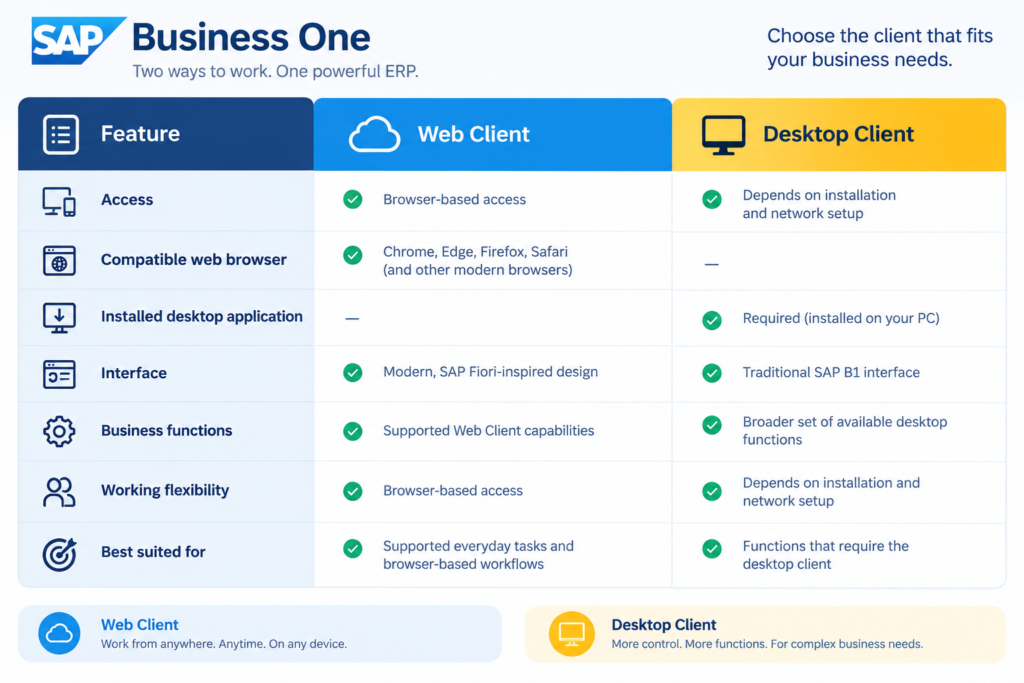
Therefore, businesses should evaluate both interfaces before deciding how employees will use SAP B1. The Web Client may suit many routine workflows, while the desktop client can remain necessary for specialised activities.
How Can Businesses Prepare for SAP Business One Web Client in 2026?
A successful deployment requires more than enabling browser access. Businesses should first identify their operational needs and technical requirements.
Step 1: Review the installed version. Check the current SAP B1 version and feature pack. Then, consult the official documentation for the relevant Web Client capabilities.
Step 2: Identify user requirements. List the tasks that sales, finance, purchasing, inventory, and management teams perform regularly.
Step 3: Check compatibility. Confirm database support, browser requirements, infrastructure, security, and licensing considerations with your SAP partner.
Step 4: Configure permissions. Give each user access only to the business functions required for their role.
Step 5: Test essential workflows. Validate document creation, reporting, approvals, and other relevant activities before wider adoption.
Step 6: Train employees. Provide practical guidance so users understand the interface and follow established business processes.
Finally, review employee feedback and system performance after deployment. This process helps identify gaps and improve the overall ERP experience.
Why Choose SAP Business One for Business Growth?
Growing businesses often struggle with disconnected systems, manual reporting, and limited operational visibility. SAP Business One brings essential business processes together within an integrated ERP platform.
It supports financial management, sales, purchasing, inventory, and other core operations. Consequently, businesses can reduce information silos and improve coordination across departments.
Furthermore, the Web Client offers another way to access supported ERP functions. Businesses can adopt suitable browser-based workflows while retaining desktop functionality where necessary.
With the right implementation and ongoing support, SAP B1 can help companies establish more consistent processes. It also provides a foundation for managing changing operational requirements as the business grows.
Conclusion
SAP Business One Web Client offers businesses a modern way to access supported ERP functions through a browser. Its interface, connected business information, and flexible access can help employees manage daily tasks more conveniently.
However, businesses should verify the capabilities available in their specific 2026 release before planning a deployment. By assessing requirements, configuring permissions, and training employees, organisations can make better use of SAP B1 and support long-term business growth.
Frequently Asked Questions (FAQs)
The Web Client offers a modern, browser-based interface for supported SAP B1 functions. Specific enhancements available in 2026 depend on the installed version and feature pack. Consult the official release documentation to confirm individual updates.
Users can access supported Web Client functions through a compatible browser. However, the underlying SAP B1 environment still requires the appropriate deployment and configuration. Some business activities may also require the desktop client.
Yes, it supports relevant sales and inventory workflows. However, the exact documents, functions, and capabilities depend on the installed release and configuration.
Yes. It can help small and medium-sized businesses access supported ERP functions through a modern browser-based interface. Its suitability depends on the company’s workflows, technical requirements, and user needs.
Businesses should review their current deployment with an SAP B1 partner. The partner can assess compatibility, available functionality, infrastructure, security, and upgrade requirements before recommending the next steps.